For a while now I've been interested in trying a project with vinyl. Trying to decide what has always been tough and it's never moved to the tops of the list. But then, inspiration hit! So now I have completed my very first project with vinyl using my Silhouette and I'm pretty happy with the results.
For our tenth wedding anniversary, my husband and I had thought we'd be talking a trip somewhere enjoying sun and calm, but really our little ones weren't ready for us to have an extended time away. So instead, embracing the life we have, we treated ourselves to an espresso machine. It's been wonderful and we still enjoy it several months later! Espresso, lungo, cappuccino, and lattes all at the touch of a button. For a tired person in the morning, it really doesn't get better than this. My husband ordered some great espresso and latte mugs from Crate & Barrel for us to use. They are plain white, which I do like but I sort of also saw a Silhouette vinyl project waiting to happen. So today, I thought, why not make that happen. Here is the end result:
I thought it would be fun to drink an espresso while putting a mustache on! And then I couldn't resist some great word art for the latte cups. It was really fun designing the items to print but the whole process was a bit more work than I thought it would be. However, I have to mention that I probably should have picked a much simpler project to start with. But then, I wouldn't be me.
Once I had the designs ready to print in the Silhouette software I went about loading the vinyl. You're told you don't need a cutting mat and that you can just load the roll but I really couldn't get that to work despite looking for many tips and tricks online. I ended up cutting a strip of vinyl and using my cutting mat.
After it's all cut, you have to strip away the excess vinyl and "weed" out the little parts. This is where I went a bit crazy since I had picked a fairly intricate design but overall it wasn't that bad. You definitely need all those little tools Silhouette recommends though!
Then I adhered the transfer paper and went about getting the designs onto the mugs. So I knew I'd have to deal with the curvature of the mugs; however, I didn't think it would be as hard. The transfer paper actually seemed to work against me a bit during this process as it is a heavy paper and as you bend it, it creases. The first design I did wasn't so hot. After removing the transfer paper, I lifted a few items up to fix them. Working slowly and creasing the transfer paper in between design elements, I was able to have more success with the second mug. That all being said, in the end, I wasn't too impressed with how the vinyl stuck to the mugs! I hope it holds up well! I do hand wash these, so I hope that adds to the longevity.
All in all, I'm glad I gave it a try. I don't think the project took that long but I was chasing toddlers in the middle of it so it felt like it took forever! I love the word art I created for the latte mugs and could easily see it as a print as well. I'm sharing it with you for free for your PERSONAL USE ONLY. You can grab it here.
Now, what next?
Thursday, October 3, 2013
Tuesday, September 17, 2013
Just in time for football! Go Badgers!
I am excited to share some new wall art in my Etsy shop! A tribute to my alma mater the Wisconsin Badgers - I bring you subway art Badger style. The print is complete with phrases, places, and other notable items that are familiar to Badger fans.
I have two versions of this work in my shop. You can grab the cardinal red & white version you see here as an instant download OR you can have the background changed to the color of your choice. The file is delivered as a 16 x 20 inch JPEG and is high-quality and print ready. There is a 1.5 inch border making it perfect for gallery wrapped canvas - which is exactly how mine will be printed. The background and text are lightly distressed to provide a vintage feel.
Saturday, September 14, 2013
A Nautical First Birthday
Well, it happened. The little man turned one. It's hard to believe that first year of life has already been accomplished. So much change in so little time - now that is certainly something to celebrate. For me, I enjoy being able to create some crafty items to spruce up the big party but with two little ones running (or toddling around) time is limited. So even more fun, is seeing how everything I'd created over the span of many (maybe six) weeks came together. No one thing was incredibly time consuming, just hard to find any time! And everything was cheap and easy! So I'm excited to share how our little Owen's nautical first birthday came together.
I wanted to take some cute photos of the little guy on his special day and thought I should make a prop for that. If you have kids, then you have cardboard! I grabbed a large piece and cut out a big number one. I used some red acrylic paint and then a star stamp using mod podge that I sprinkled with blue glitter. Fast, easy, and pretty cute. Now, to just get that baby to hold it just right for the camera. ;)
And now, on to the party. First, a few things to be said on the theme of nautical. It's pretty general. That can take you many different ways but that's what I loved about it - I could toss in whatever I could make work. I choose to stay with very traditional colors - Red, Blue, and Lt. Blue. This helped me to not only find supplies easily but anything that had to do with the 4th of July also seemed to work in well!
DECOR
I have found that keeping things simple is often the easiest way to set the stage for your party. Not pictured, but I did make a welcome sign for our door that was similar to the high chair banner pictured here. It let everyone know that the party was happening in our back yard. That way we didn't have to keep running to the door to welcome guests as they arrived. The door sign and high chair banner were designed in Illustrator along with the fun ship wheels. I then placed them as .PNG files in my Silhouette software to print and cut. If you've not used .PNG files in the software before, it's super easy! I describe how to do that in this post here.
For my older son, I made him a special shirt to wear at his parties so I wanted to do the same here, but I also wanted him to feel included on his little bro's special day so I made two shirts this time. The birthday boy, Owen, had a little sailboat and older brother got "Captain in training"...but if you have a two year old, you know they pretty much take charge of most situations! :) I used the Avery iron on transfer paper and my home printer.
FAVORS
The children attending were 4 years and under so I wanted to do something fun for favors but nothing with a bunch of little toys in it. So I picked up some colorful sand buckets at Michael's on the cheap. I then designed a name label for each child which I printed onto the Silhouette clear sticker paper. After cutting with my Silhouette, I put them on the bucket. I did this same thing for some colorful water bottles I found as well. Also included was a sailor hat. I had found a dozen of them on Amazon and did a little fabric stencil of anchors and sailboats. They didn't turn out the greatest but they were still pretty darn cute. Finally, we had a squirt gun for each kiddo - and that led to a lot of fun for them outside! Lastly, I used one bucket to put a Thank You treat of salt water taffy for each guest to take when they left for home.
THE FOOD
I like to keep the food pretty simple so I too can have fun at the party, but that doesn't mean that you can't set it up to look festive! I found red and blue tablecloths, paper plates and napkins at my local Michael's store. With the sales and coupons they have, you can find this stuff fairly cheap. They tend to only have bold colors but that worked fine for this party! To incorporate my theme, I knotted some sailor rope around the utensils and put some golffish in a fish bowl. We used a 4th of July table cloth for the beverage table.
A few things I've learned over the years with parties has been that I can fit way more food and make the buffet look extra fancy just by adding some height! I use boxes or anything really under the table cloth to make places for the serving trays. It looks nice, let's you fit more in, and makes it easier for your guests to reach for things. It was also great to put out the lemonade, iced tea, water, and mixers in a way that guests could help themselves. There's always a lot going on at kiddos parties so it was great to know everyone could refresh their drinks as they wanted to. I also used the Silhouette to cut out some confetti in the shape of ship wheels and anchors. It was easy but tedious to pick up off the sticky mat - definitely needed those tools!
The cake was made locally by Delicately Delicious. I love how it turned out and it tasted great too! I used the number one I had made as decoration and also set the main cake off with some fish net.
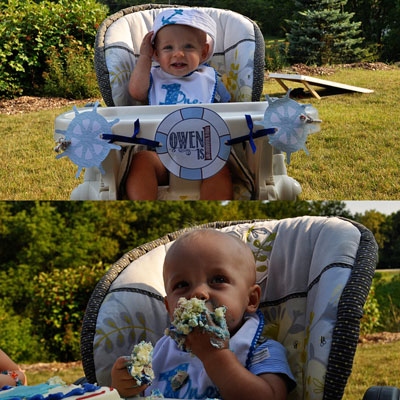
And it wouldn't be a good birthday post if I didn't include a picture of our cutie enjoying his cake! He really took charge of it, both hands in, and enjoyed it. And no, we didn't let him finish the whole thing! I think he would have exploded!
All in all, it was a really fun day! Everyone had fun, ate well, and the birthday boy enjoyed! I had so much fun pulling this together for him too! Happy First Birthday Owen!!
I wanted to take some cute photos of the little guy on his special day and thought I should make a prop for that. If you have kids, then you have cardboard! I grabbed a large piece and cut out a big number one. I used some red acrylic paint and then a star stamp using mod podge that I sprinkled with blue glitter. Fast, easy, and pretty cute. Now, to just get that baby to hold it just right for the camera. ;)
And now, on to the party. First, a few things to be said on the theme of nautical. It's pretty general. That can take you many different ways but that's what I loved about it - I could toss in whatever I could make work. I choose to stay with very traditional colors - Red, Blue, and Lt. Blue. This helped me to not only find supplies easily but anything that had to do with the 4th of July also seemed to work in well!
DECOR
I have found that keeping things simple is often the easiest way to set the stage for your party. Not pictured, but I did make a welcome sign for our door that was similar to the high chair banner pictured here. It let everyone know that the party was happening in our back yard. That way we didn't have to keep running to the door to welcome guests as they arrived. The door sign and high chair banner were designed in Illustrator along with the fun ship wheels. I then placed them as .PNG files in my Silhouette software to print and cut. If you've not used .PNG files in the software before, it's super easy! I describe how to do that in this post here.
For my older son, I made him a special shirt to wear at his parties so I wanted to do the same here, but I also wanted him to feel included on his little bro's special day so I made two shirts this time. The birthday boy, Owen, had a little sailboat and older brother got "Captain in training"...but if you have a two year old, you know they pretty much take charge of most situations! :) I used the Avery iron on transfer paper and my home printer.
I do love to digital scrapbook as well so I figured why not show off some of the pages I had of Owen's first year! I purchased this Recollections stand to fit my 12x12 pages in. There were some from his hospital birth and NICU stay, as well as monthly update pages. I noticed several people checking them out and I think it was a fun way to show just how much he changed over that first year.
And finally, I do love a great birthday banner! I wanted the decor to be more modern than cutesy so I decided to design some papers with newsprint background and stripes and stars that looked painted and stamped on. I used some sailor's rope to string the whole thing up. I had some on hand from a past crafting project but you can pick some up at your local hardware store. Generally, they can just cut you the length you need.
FAVORS
The children attending were 4 years and under so I wanted to do something fun for favors but nothing with a bunch of little toys in it. So I picked up some colorful sand buckets at Michael's on the cheap. I then designed a name label for each child which I printed onto the Silhouette clear sticker paper. After cutting with my Silhouette, I put them on the bucket. I did this same thing for some colorful water bottles I found as well. Also included was a sailor hat. I had found a dozen of them on Amazon and did a little fabric stencil of anchors and sailboats. They didn't turn out the greatest but they were still pretty darn cute. Finally, we had a squirt gun for each kiddo - and that led to a lot of fun for them outside! Lastly, I used one bucket to put a Thank You treat of salt water taffy for each guest to take when they left for home.
THE FOOD
I like to keep the food pretty simple so I too can have fun at the party, but that doesn't mean that you can't set it up to look festive! I found red and blue tablecloths, paper plates and napkins at my local Michael's store. With the sales and coupons they have, you can find this stuff fairly cheap. They tend to only have bold colors but that worked fine for this party! To incorporate my theme, I knotted some sailor rope around the utensils and put some golffish in a fish bowl. We used a 4th of July table cloth for the beverage table.
A few things I've learned over the years with parties has been that I can fit way more food and make the buffet look extra fancy just by adding some height! I use boxes or anything really under the table cloth to make places for the serving trays. It looks nice, let's you fit more in, and makes it easier for your guests to reach for things. It was also great to put out the lemonade, iced tea, water, and mixers in a way that guests could help themselves. There's always a lot going on at kiddos parties so it was great to know everyone could refresh their drinks as they wanted to. I also used the Silhouette to cut out some confetti in the shape of ship wheels and anchors. It was easy but tedious to pick up off the sticky mat - definitely needed those tools!
The cake was made locally by Delicately Delicious. I love how it turned out and it tasted great too! I used the number one I had made as decoration and also set the main cake off with some fish net.
And it wouldn't be a good birthday post if I didn't include a picture of our cutie enjoying his cake! He really took charge of it, both hands in, and enjoyed it. And no, we didn't let him finish the whole thing! I think he would have exploded!
All in all, it was a really fun day! Everyone had fun, ate well, and the birthday boy enjoyed! I had so much fun pulling this together for him too! Happy First Birthday Owen!!
Wednesday, August 21, 2013
Fly Away With Me Album
As much as I love digital every so often I get the itch to make an an album you can touch and feel! It's always fun to merge digital into the tangible such as here and here; and now I've done it again and it was so much fun! I really enjoyed how my Fly Away With Me papers and elements turned out and thought they would be a fun set to use to make an album for my mom of the kiddos. You can find them in my Etsy shop too! This time, I was also excited to use my new Silhouette Cameo machine! I've got several pictures in this post but now realize that I did not take a picture of the cute cover! Oh well, I'll have to steal it from my mom sometime and update this post with it. However, I do have plenty of fun features to show you that you can incorporate into your own handmade scrapbooks!
First, a little note about printing. This photo is just to illustrate that when printing your digital files, it really does matter if you select the correct type of media you are printing on. That helps your printer use the correct color profile and give you the best possible match to what you see on your screen. Now if your monitor is not calibrated correctly, that is a whole other issue!
I started by planning the entire book in Photoshop. I chose the dimensions I would use and shapes for the covers and pages. I then clipped papers from my Fly Away With Me paper collection to create the pages. Some I left blank, but others I added stamps or embellishments to for dimension. I saved all of the covers and pages as .PNG files so I could use them with my Silhouette.
Next, I looked through my photos to see what and how many I wanted to include and my goodness did I get a ton of them in! I printed them in varying sizes - mostly 3x3 inches, 4x4 inches, and 4x6 inches.
Finally, I decided to make some unique pages for which I would need to create some cutting files to use with my Silhouette. I determined the measurements for those and created them, saving them to .PNG files as well.
And now it was time to open the files in my Silhouette software to print and cut!! Oh, the planning is the hardest part but this next step is so cool! It's so fun to see everything starting to take shape! After taking care of all the items I had ready to go from Photoshop, I also opened the Fly Away With Me Elements (and a few various others created by myself and other designers) and dragged those .PNG files into my Silhouette document. In order to create a cutting path in the software, I use the trace feature and under Trace Settings I uncheck all the boxes except for Threshhold and move the slider there up to 100%. Then I often select "Trace Outer Edge" as this will cut all the way around your shape. However, if there is a shape that you some of the inside cut out you need to select "Trace." For example, in the picture below, I have the word "Cherish" (from Heidi Swapp) and wanted to the white part cut out of the loops from the "H" so I selected "Trace" to do so.
With all my pictures, pages, and embellishments cut and ready to go, it was time to put this thing together. I used chipboard from a cereal box and spray adhesive to adhere the paper to the front and back covers so that it was nice and sturdy. For the interior pages I used Epson Premium Presentation Paper Matte and adhered the alternating pages together. This paper has a pretty good weight when you use it this way. Once I had the pages organized but before embellishing, I used The Cinch to bind it together nicely. The reason I say BEFORE embellishing is that inevitably, something always goes wrong when punching holes for me so if I have to redo a page, then there isn't a ton of wasted work and materials. Also, it helps you put your embellishments in an area of the page that won't interfere with turning the book. Now, here are a few of the details I'd like to share with you.
I created these stacked photo mats so I could put many pictures on one page. These shapes I created and cut them with my Silhouette. I used Heidi Swapp's No Limits Paper pack below. The newsprint had a nice contrast to the papers. You can put pictures on both sides and it was a fun way to group things together.
Then I made these cute little divided pages. They were tricky to bind but, in the end, it is fun to flip the half pages back and forth. I did have to insert the pictures (front and back) before binding them. Again, I cut these shapes onto The No Limits paper. I added some fun tabs and embellishments here and there to spruce them up!
Since the album was for the entire year, I had to have a special page documenting our sweet new addition. The onesie cut shapes were from Deana Rutter and the cut words were from Karla Dudley.
Just have to point out one "love" about the Silhouette again - look at that tiny kite string, cut perfectly! You really do need some of the tools to get that out and onto your page but it is awesome to have something so delicate and precise.
We had a bunch of cute Christmas photos and I had thought to do a separate album but then I decided why not just put it all together. So I made this envelope-type page and included these tabbed photo files with journaling that I cut onto red and green cardstock - tis the season right?
I was able to fit four of these folded files on each side, each containing two 4x6 inch photos.
And ta da! That's it. I hope you found it inspirational and are getting ready to make your own album!
First, a little note about printing. This photo is just to illustrate that when printing your digital files, it really does matter if you select the correct type of media you are printing on. That helps your printer use the correct color profile and give you the best possible match to what you see on your screen. Now if your monitor is not calibrated correctly, that is a whole other issue!
I started by planning the entire book in Photoshop. I chose the dimensions I would use and shapes for the covers and pages. I then clipped papers from my Fly Away With Me paper collection to create the pages. Some I left blank, but others I added stamps or embellishments to for dimension. I saved all of the covers and pages as .PNG files so I could use them with my Silhouette.
Next, I looked through my photos to see what and how many I wanted to include and my goodness did I get a ton of them in! I printed them in varying sizes - mostly 3x3 inches, 4x4 inches, and 4x6 inches.
Finally, I decided to make some unique pages for which I would need to create some cutting files to use with my Silhouette. I determined the measurements for those and created them, saving them to .PNG files as well.
And now it was time to open the files in my Silhouette software to print and cut!! Oh, the planning is the hardest part but this next step is so cool! It's so fun to see everything starting to take shape! After taking care of all the items I had ready to go from Photoshop, I also opened the Fly Away With Me Elements (and a few various others created by myself and other designers) and dragged those .PNG files into my Silhouette document. In order to create a cutting path in the software, I use the trace feature and under Trace Settings I uncheck all the boxes except for Threshhold and move the slider there up to 100%. Then I often select "Trace Outer Edge" as this will cut all the way around your shape. However, if there is a shape that you some of the inside cut out you need to select "Trace." For example, in the picture below, I have the word "Cherish" (from Heidi Swapp) and wanted to the white part cut out of the loops from the "H" so I selected "Trace" to do so.
With all my pictures, pages, and embellishments cut and ready to go, it was time to put this thing together. I used chipboard from a cereal box and spray adhesive to adhere the paper to the front and back covers so that it was nice and sturdy. For the interior pages I used Epson Premium Presentation Paper Matte and adhered the alternating pages together. This paper has a pretty good weight when you use it this way. Once I had the pages organized but before embellishing, I used The Cinch to bind it together nicely. The reason I say BEFORE embellishing is that inevitably, something always goes wrong when punching holes for me so if I have to redo a page, then there isn't a ton of wasted work and materials. Also, it helps you put your embellishments in an area of the page that won't interfere with turning the book. Now, here are a few of the details I'd like to share with you.
I created these stacked photo mats so I could put many pictures on one page. These shapes I created and cut them with my Silhouette. I used Heidi Swapp's No Limits Paper pack below. The newsprint had a nice contrast to the papers. You can put pictures on both sides and it was a fun way to group things together.
Then I made these cute little divided pages. They were tricky to bind but, in the end, it is fun to flip the half pages back and forth. I did have to insert the pictures (front and back) before binding them. Again, I cut these shapes onto The No Limits paper. I added some fun tabs and embellishments here and there to spruce them up!
Since the album was for the entire year, I had to have a special page documenting our sweet new addition. The onesie cut shapes were from Deana Rutter and the cut words were from Karla Dudley.
Just have to point out one "love" about the Silhouette again - look at that tiny kite string, cut perfectly! You really do need some of the tools to get that out and onto your page but it is awesome to have something so delicate and precise.
We had a bunch of cute Christmas photos and I had thought to do a separate album but then I decided why not just put it all together. So I made this envelope-type page and included these tabbed photo files with journaling that I cut onto red and green cardstock - tis the season right?
I was able to fit four of these folded files on each side, each containing two 4x6 inch photos.
And ta da! That's it. I hope you found it inspirational and are getting ready to make your own album!
Monday, July 15, 2013
When one door closes...
Well, I have to admit that I'm pretty sad to see Design House Digital close shop. I have been at that site as a scrapper for a long time and was very excited to join on as a designer last December. Alas, the shop owner has decided to close the virtual doors and I must determine the course of Little Birdie Digital Designs.
So what's next? I don't want to stop designing but right now just isn't the right time for me to join another digital scrapbooking site. I've got a lot of commitments at home with our two little ones and I'm just not the type to pull an all nighter! So, in the mean time, I'm working on uploading many of my existing kits (but not all) to my new store on Etsy! You can find it here. At this moment everything in my store is available via instant download, so please, stop by and check it out. Bookmark it and come back later too!
As for future plans, well, I've long wanted to do a few other types of design work so while I still will put together a scrapbooking kit here and there, you will also see my shop start to fill up with wall art, home decor, DIY printable projects, invitations, party printables, and who knows what! I'm quite excited about being able to put everything together in one place. I mean, I get excited thinking about downloading some party printables and then later scrapbooking about it with coordinating items, don't you?
Well, I hope you will check back often to see what I'm up to.
Sarah
So what's next? I don't want to stop designing but right now just isn't the right time for me to join another digital scrapbooking site. I've got a lot of commitments at home with our two little ones and I'm just not the type to pull an all nighter! So, in the mean time, I'm working on uploading many of my existing kits (but not all) to my new store on Etsy! You can find it here. At this moment everything in my store is available via instant download, so please, stop by and check it out. Bookmark it and come back later too!
As for future plans, well, I've long wanted to do a few other types of design work so while I still will put together a scrapbooking kit here and there, you will also see my shop start to fill up with wall art, home decor, DIY printable projects, invitations, party printables, and who knows what! I'm quite excited about being able to put everything together in one place. I mean, I get excited thinking about downloading some party printables and then later scrapbooking about it with coordinating items, don't you?
Well, I hope you will check back often to see what I'm up to.
Sarah
Subscribe to:
Comments (Atom)